
Home Network Installation Perth by SmartSpace Installations - Perth, WA

Network · Perth

Home Network Installation Perth

Wi-Fi and wired networks that simply work.

Overview

Home network installation across Perth - Ubiquiti UniFi, structured Cat6A cabling, mesh Wi-Fi 6E and proper firewall configuration for fast, reliable connectivity.

A smart home runs on its network. Cheap routers and consumer mesh kits collapse under the load of 60+ devices. We install enterprise-grade Ubiquiti UniFi platforms designed to carry the whole household - streaming, CCTV, voice, automation, without dropouts.

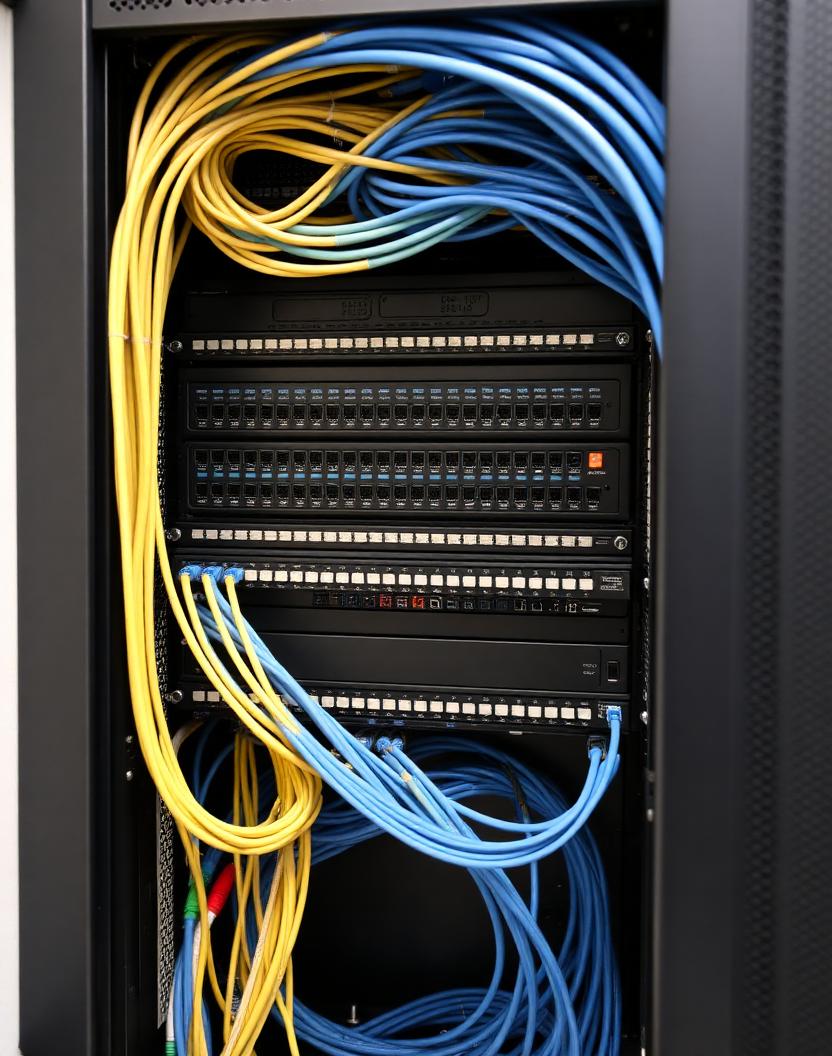
Cabling is Cat6A to every access point, terminated to a labelled patch panel, with PoE switching and proper VLAN segmentation for IoT, guests and the family.

Every install is documented, Fluke-tested and handed over with credentials you actually own.

01 · Detail

Home Wi-Fi installation Perth - mesh, tri-band and Wi-Fi 6E

Home wifi installation Perth is the single most common enquiry we get after CCTV. Most Perth homes we visit have a builder-supplied router in a cupboard, one or two dead zones, and Wi-Fi that struggles the moment two people are on a Zoom call and someone else is streaming.

As a wifi installer Perth homeowners actually recommend, we replace consumer kit with enterprise-grade Ubiquiti UniFi - a Dream Machine gateway, PoE switch, and two to six Wi-Fi 6E access points ceiling-mounted where the signal actually needs to be, not where the NBN box happens to sit.

Wifi mesh installation Perth is genuinely necessary in double-storey homes, in properties longer than about 25 metres, and in any home built with double-brick internal walls. We site-survey with a spectrum analyser first, map coverage, then place APs where they matter. A proper wifi mesh installation Perth-wide starts around $1,800 for a two-AP system and $3,500–$6,500 for a whole-home four-to-six-AP UniFi platform.

  • 01Home wifi installation Perth - full site survey before we quote
  • 02Wifi installer Perth homes trust for double-brick and double-storey work
  • 03Wifi mesh installation Perth using Ubiquiti UniFi Wi-Fi 6E access points
  • 04Structured Cat6A cabling, PoE switching, one clean SSID across the whole home

02 · Detail

Structured cabling: the part that outlives the hardware

The routers and access points in your house have a five to seven year life. The cable in the walls has thirty. That's why we treat a home network installation as a cabling job first: Cat6 as a minimum, Cat6A to access point positions and anywhere a future 10-gigabit link makes sense, terminated to standard and tested run by run.

Outlet planning is where money is saved or wasted. Two data outlets behind every TV, two at each desk, one at each access point position, one at the doorbell and each camera, and a couple of spares in the ceiling for whatever comes next. Cable is cheap during construction and expensive afterwards.

Every run is labelled at both ends, punched into a patch panel rather than dangling in a cupboard, and recorded on a network map that gets handed over with the job. It's the difference between an electrician finding the right cable in five minutes or spending an afternoon on it.

  • 01Cat6 or Cat6A to every outlet, tested and certified before sign-off
  • 02Patch panel and rack rather than loose cables in a cupboard
  • 03PoE switch feeding access points, cameras, doorbells and sensors
  • 04Dedicated circuit and ventilation at the rack location
  • 05Labelled network map and as-built documentation at handover

03 · Detail

Where the rack goes and why it matters

The comms rack needs three things: ventilation, power on its own circuit, and enough space to work. The default builder location - a sealed cupboard under the stairs - fails on all three, and heat is what kills switches and gateways early.

In most Perth homes we end up in the garage, the laundry, or a purpose-built cupboard with a vent. Garages are cool enough for most of the year but need dust management; we use an enclosed rack with filtered ventilation rather than open shelving.

The rack also wants to be reasonably central to the house. Cable runs have a practical limit and a rack tucked in a far corner adds length to every single run, which means more cable, more labour and less margin for a future re-patch.

04 · Detail

NBN, fibre and connecting the outside world

The NBN connection point is fixed where the technician installed it, and it's very often nowhere near where the rack should be. Rather than build the network around the NBN box, we run a Cat6 link from the NTD to the rack and put the gateway, switch and all the intelligence in one place.

Homes on FTTP and HFC generally have plenty of headroom for a modern network. Homes still on FTTN in the older Perth suburbs are limited by the copper, and no amount of internal cabling changes that - though it does mean the internal network stops being the bottleneck, which is usually the actual complaint.

For properties where the connection genuinely can't deliver, we'll set up a failover on the gateway - a second connection or a mobile broadband backup that takes over automatically. That's worth having for anyone working from home.

05 · Detail

Working from home, cameras and load on the network

A modern Perth home puts more on the network than a small office did a decade ago. Six to eight cameras writing to a recorder, two people on video calls, a couple of 4K streams, a games console downloading in the background, and thirty smart devices chatting away.

Cameras are the heaviest and the easiest to isolate. Recording traffic between camera and NVR should never cross the same path as the family's internet traffic, so we put it on a separate VLAN and often a separate switch port group entirely.

Video calls get priority through quality-of-service rules on the gateway, so somebody downloading a game update doesn't drop a work meeting. It's a five-minute configuration job that people notice every single day.

FAQs

Frequently asked.

Quick answers to what Perth clients ask most. Anything we haven't covered? Get in touch.

How much does home wifi installation Perth cost?

A basic wifi installer Perth job (single Ubiquiti Dream Router replacing a consumer router) is $650–$950 installed. A proper mesh setup with two ceiling-mounted Wi-Fi 6E access points is $1,800–$2,600. Full whole-home wifi mesh installation Perth homes typically need (four to six APs, PoE switch, Cat6A cabling) runs $3,500–$6,500 depending on size.

Do I really need wifi mesh installation Perth, or is a single router enough?

Single-storey homes under about 200m² on brick veneer can usually run on one well-placed access point. Anything double-storey, double-brick, or over 250m² needs proper wifi mesh installation Perth - two or more Ubiquiti UniFi APs on Cat6 backhaul. Wi-Fi extenders that plug into power points are not mesh and we don't install them.

Brands We Specify

Ubiquiti UniFiCisco MerakiArubaTP-Link Omada

Next Steps

Talk to a senior engineer.

We'll meet you on site, listen to the brief, and quote a system designed for the way you actually live.

Book a consultation

Why Smart Space

Engineered to disappear.

Twelve years on Perth jobs, 500+ homes wired, and a 10-year workmanship warranty on every install. One small team - engineers, not generalists.

Call